Illustrator knowhow
Jun 07, 2007 74 Comments
Last week I received an email from Adobe Illustrator’s product manager, Phil Guindi, who introduced me a new CS3 feature called knowhow. It is “a technology preview that delivers single-click, contextual access to relevant help information from a panel in Adobe CS3.” You can find the knowhow panel by going to menu Window > Adobe Labs > knowhow (yes, it is very hidden). When you select a tool, knowhow panel will instantly display the information about the tool and tell you how to use it. In other word, knowhow is a live help panel. Here I will show you how to use knowhow and please share your thoughts.
Introduction
With the rising demand of illustration (vector illustration is BIG trend now from advertisement, fashion, web to motion graphics) and Flash, I think Illustrator is a must-know and must-have software. Adobe did a very good in CS3 on Flash integration – Flash CS3 now literally allows you to import anything (even very large complex objects) from Illustrator. You can even preserve layers, groups, and object names. However, learning Illustrator is a bit challenging for a lot of digital artists due to the limited resources available on the internet. To help your learning easier, CS3 introduced a new feature called knowhow, it instantly displays information about the selected tool. Note: knowhow is still an experimental project and only available in Illustrator CS3. Since most people still don’t know about knowhow (I didn’t know until Phil told me), please help to spread out the words by blogging about knowhow.
How to use knowhow
If you don’t have Illustrator CS3 or haven’t upgraded yet, you can download a free trial Illustrator from Adobe website. Go to menu Window > Adobe Labs > knowhow to open up knowhow panel. Click on any tool, notice knowhow panel instantly tells you everything about the tools. Now press Cmd, Option, or Shift key, knowhow will highlight the key feature.

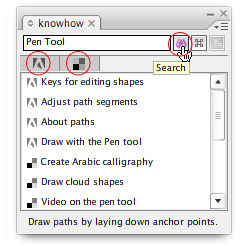
You can also use knowhow to search Illustrator’s help topics. Click on the search icon, knowhow will display the help results and also pull in related links from a community-generated del.icio.us account (very web 2.0, right?). Users can also submit tutorials and links to knowhow del.icio.us to share with the community.
Comments and Feedbacks
Phil and I have been discussing about knowhow and would like to hear your thoughts on knowhow. Please post your comments or discussions here. If you would like to discuss privately, you may contact me directly.
- What do you think of knowhow? Any ideas or suggestions to make it better?
- Will you be interested in participating in the content contribution (submit links and tutorials)?
- Do you think knowhow is a cool tool to be included in other Adobe software such as Photoshop, Flash, and Dreamweaver?


