WordPress Short URL for Twitter
Jan 08, 2010 22 Comments
You may have noticed that Twitter no longer automatically shorten URLs in the tweets. The great thing is now you can promote your own domain in the tweets. If you are using WordPress, you can take advantage of the default permalink structure to shorten URLs. Instead of posting the "pretty" URL, you can shorten it by removing the "www." and using the post ID in the URL (e.g. "?p=1204").
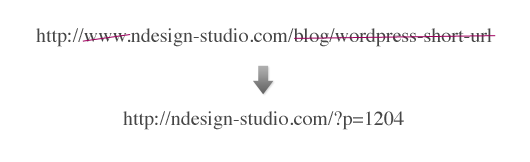
Advantages of Using Your Own Domain URLs:
- Promote your site (branding): when people retweet, your domain will fly around.
- More meaningful: readers at least know the link goes to your site. Shorten URL (e.g. bit.ly/buSzh) is meaningless because readers don’t know where the link is directing to.
- Build trust & increase click rate: people tend to click on the links that they trust rather than unknown URLs (ie. bit.ly/buSzh might be a spam link).
How to Find Post ID?
- Go to Admin > Edit Posts, hover over the post link, look at the status bar, the number at the end of the URL is the post ID.
- When you are editing or previewing a post, the number in the URL (on the adddress bar) is the post ID.
Parrot AR.Drone: iPhone-Controlled Helicopter Site: Art in My Coffee
Collapse All
22 Comments… +add yours?
Write Your Comments
Reply in this thread


Jan 08, 2010 12:29 pm
Smashing Share
Its great feature. Thanks for sharing this. Would use this next instead to URL shorten services. I agree that many people use URL shorten services to spam around.
Jan 08, 2010 12:31 pm
Ignaty Nikulin
Nice idea! Thank you! Too bad I quit use WP :)
Jan 08, 2010 12:33 pm
Malcolm Bastien
Great idea. I supposed if you do it this way it’s still possible to track the traffic stats coming from twitter since it’s not in fact a “short url” type of redirect that’s going on and it’s in fact a real link.
Thanks Nick!
Jan 08, 2010 12:52 pm
rado
this is a great idea! thanks :)
Jan 08, 2010 1:08 pm
Matt
Great idea. Although I have to ask…don’t most people use clients for twitter these days which have there own shortners?
Jan 08, 2010 1:14 pm
Thorvald
Great idea, thanks for sharing this. :-)
Jan 08, 2010 2:08 pm
Frankie
Hey Nick,
is it possible to create a short URL like
http://bit.ly/Renommee
For example: ndesign-stuido.com/short-url
It’s much better for your google analytics account.
Jan 08, 2010 2:53 pm
Arpit Jacob
I been using it for quite some time, I even wrote a WordPress theme function to automatically post from WordPress to twitter every time you write a new post on you blog.
http://www.clazh.com/post-wordpress-to-twitter-automatically-with-short-urls-no-plugin-required/
Jan 08, 2010 5:44 pm
Dani
Nice Nick, I hadn’t thought of this. Thanks!
Jan 08, 2010 6:05 pm
ocube
Does this work for all versions of wordpress?
Jan 08, 2010 10:58 pm
Design Informer
The only thing with this is you are unable to track how many clicks you get, etc. But maybe there is a way that I don’t know about?
Jan 10, 2010 4:38 pm
Hidayat Sagita
I think if we use GA there won’t be a problem.
Jan 08, 2010 11:48 pm
viettel adsl
But why we not using the full url structure? I think it’s better short url???
Jan 09, 2010 3:27 pm
kok aan huis
Hey, thanks for sharing :-)
Jan 10, 2010 6:05 am
Jason Ferguson
Thanks for the tip. Stuff like this is gets taken for granted sometimes until someone actually takes the time to point it out. Personally I hate shortened URL’s, purely from a readability and security standpoint. I like to have “some” idea of where I’m clicking through to.
Jan 11, 2010 9:08 am
David
Sounds Good.
I Use the “Reveal IDs for WP Admin” Plugin for WordPress. That show the ID of each post in the Articleoverview. Must Have! :)
Jan 11, 2010 5:49 pm
designi1
But when your´re searching on google or other the http:… /blog/wordpress-short-url-for-twitter URL can be useful for the reader to know faster what content it ill be found on the page. i use myself also short URL´s, its an option..i saw benefits from both sides _D
Jan 12, 2010 3:55 am
Dave
I’m surprised nobody has mentioned this yet:
If you do this, you will take an SEO hit… Google will not like your web site as much as it used to. The long URL’s are desirable because google indexes the words in them and it helps your site and your content be found easier.
I prefer to use a plugin like “Redirection” that lets you preserve your link structures AND use short URL’s.
For example, you create a post called: http://www.ndesign-studio.com/blog/wordpress-short-url-for-twitter and set up a Redirect so that ndesign.studio.com/short redirects to the long URL. It’s the best of both worlds (plus the plugin lets you track clicks to your short URL.
Jan 22, 2010 9:36 pm
Tim Nicholson
Dave, you are correct that the search engines frown upon having many URL’s that point to the same content. That’s because bad websites do this as a trick to try to increase their organic page rank. However, Wordpress 2.9 automatically adds what is called a “canonical URL” to every page. That means regardless of what URL the search engine followed to arrive at the content, it knows what the “canonical” or “preferred” link is. So if you are on WP 2.9, this shouldn’t be an issue.
Go to any page on a WP 2.9 site and you’ll see something like this:
At least my site does it and its documented in the WP Codex for v2.9 here:
http://codex.wordpress.org/Version_2.9
Jan 12, 2010 4:54 am
Nathan Staines
If you add the WordPress.com stats plugin to your site you’ll notice there’s a ‘Get Shortlink’ button added to the backend where you compose your posts…
It appears right underneath the title input field.
Jan 14, 2010 10:05 pm
Bill
I use this Wordpress plugin called Pretty Link (Free version) or Pretty Link Pro (Paid version) that allows me to create a link to any website (including internal redirects) and I can set the URL. For example, this URL http://designinsidechicago.com/32t will link to the pretty link pro site. The pro version also has other awesome features that allow you to use a pretty bar which I used in the previous link, and I can automatically have it tweet new posts. And there is awesome reporting to track your hits. Basically it is tr.im or bit.ly for your own Wordpress site.
In short, I LOVE this plug-in and have been using it in my tweets for over a year now. It is definitely worth checking out.
Feb 17, 2010 5:57 am
Weddings Fashion
you are correct that the search engines frown upon having many URL’s that point to the same content. That’s because bad websites do this as a trick to try to increase their organic page rank. However, Wordpress 2.9 automatically adds what is called a “canonical URL” to every page. That means regardless of what URL the search engine followed to arrive at the content, it knows what the “canonical” or “preferred” link is. So if you are on WP 2.9, this shouldn’t be an issue.